

Huawei Y6p FRP done.
1. Turn OFF the unit
2. Disassemble the unit
3. Remove the battery
4. OPEN BFT
5. DOWNLOAD MTK drivers.
6. click 1. and 2.
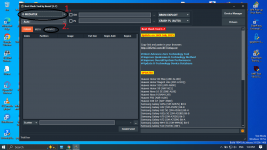
7. CLICK RESET FRP
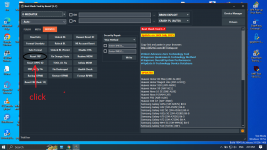
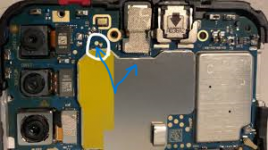
8. TESTPOINT connect the arrow using twizzer NOTE: remove the BATTERY
9. Connect. and wait til detected
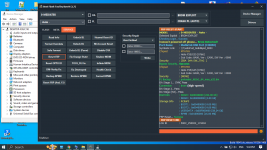
DONE.
1. Turn OFF the unit
2. Disassemble the unit
3. Remove the battery
4. OPEN BFT
5. DOWNLOAD MTK drivers.
6. click 1. and 2.
7. CLICK RESET FRP
8. TESTPOINT connect the arrow using twizzer NOTE: remove the BATTERY
9. Connect. and wait til detected
DONE.

