This guide outlines the most efficient and transparent method for activating Microsoft Office suites. Instead of using third-party executables (.exe) that often trigger antivirus warnings or contain malware, we will utilize the Microsoft Activation Scripts (MAS)—an open-source, community-vetted solution.
Supported Products:
Activation Instructions (Ohook Method):
 Important Disclaimers & Safety Guidelines:
To ensure the safety of our community members and the integrity of this forum, please take note of the following:
Technical Documentation:
For advanced troubleshooting and detailed FAQs, please refer to the official documentation at massgrave.dev.
Supported Products:
- Microsoft 365 (Office 365)
- Office 2024, 2021, 2019, 2016
- Office 2013 / 2010
- Visio and Project Professional
Activation Instructions (Ohook Method):
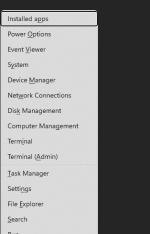
- Launch PowerShell as Administrator:
Right-click the Start button and select Windows PowerShell (Admin) or Terminal (Admin). - Execute the Script:
Copy and paste the following command into the terminal and press Enter:
- Select Activation Option:
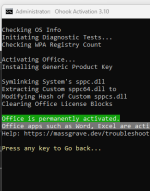
A command-line menu will appear. Press the number corresponding to [2] Ohook (this is the recommended method for a permanent Office activation). - Completion:
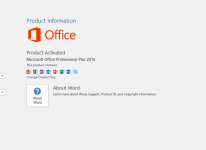
The process will run automatically. Once you see the message "Product Activation Successful," you may close the window and launch any Office application to verify.
Important Disclaimers & Safety Guidelines:To ensure the safety of our community members and the integrity of this forum, please take note of the following:
- Educational Purpose Only: This guide is provided for informational and educational purposes. The use of activation scripts is technically a violation of the Microsoft Services Agreement. Proceed at your own risk.
- Personal Use Only: It is strictly advised not to use this method on corporate, government, or educational institution hardware. Organizations are subject to software audits, and using unlicensed software can result in significant legal liabilities.
- Verification of Source: The MAS project is open-source. You are encouraged to review the source code yourself at the Official GitHub Repository to ensure transparency and security.
- Limitations: For Microsoft 365 users, this method activates the desktop applications only. It does not provide server-side benefits such as the 1TB OneDrive cloud storage or Outlook premium features.
- Support the Developers: If you or your business rely on these tools for daily productivity, please consider purchasing a genuine license from the Microsoft Store to receive official updates and technical support.
Technical Documentation:
For advanced troubleshooting and detailed FAQs, please refer to the official documentation at massgrave.dev.