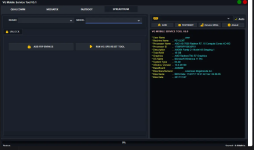
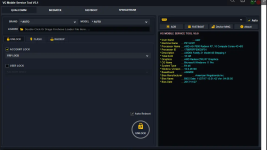
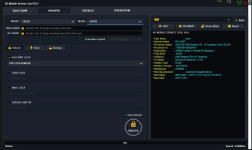
The VG Tool V5.1 is back in 2025 with major improvements and powerful features, now bundled with a free k3ygen for lifetime activation. Whether you're a professional mobile technician or an enthusiast who frequently works with Android devices, this tool is a must-have. It supports a wide range of operations across multiple chipsets, including MediaTek (MTK), Qualcomm, Spreadtrum (SPD), and Fastboot modes. Best of all, it works offline and offers lifetime access.
 What Is VG V5.1 Tool?
VG Tool V5.1 is a professional Android servicing utility that allows users to perform multiple tasks on smartphones and tablets. The latest version — VG Tool V5.1 (2025)—introduces a more stable interface, increased chipset compatibility, and new automation options for common functions such as
Pattern lock removal
Factory reset/format device
Flash firmware (ROM)
FRP (Factory Reset Protection) bypass
Bootloader unlock in Fastboot mode
SPD device formatting and unlocking
Its offline functionality means you don’t need a constant internet connection to use it, and with the included k3ygen, you can activate it permanently without extra cost.
 What’s New in VG Tool V5.1 (2025 Update)
The 2025 update brings several powerful features that make VG Tool more useful than ever:
 Support for Latest Android 13 & 14 Devices
Improved SPD and MTK Module Performance
One-Click Pattern Lock Removal (No Data Loss for MTK)
Firmware Flashing with Auto Port Detection
Bug Fixes for Qualcomm EDL Mode Flashing
New GUI with Fastboot One-Tap Commands
K3ygen Included for FREE Lifetime Activation
 How to Use VG Tool V5.1—Step by Step
Connect Your Android Device via USB
Choose the Appropriate Chipset (MTK, SPD, Qualcomm, or Fastboot)
Select the Operation (e.g., Format, FRP, Flash)
Click “Start” and Wait for the Process to Complete
Device will Reboot Automatically or Show a Success Message
Make sure you have the correct drivers installed and always back up important data before performing any operation.
Link:
What Is VG V5.1 Tool?VG Tool V5.1 is a professional Android servicing utility that allows users to perform multiple tasks on smartphones and tablets. The latest version — VG Tool V5.1 (2025)—introduces a more stable interface, increased chipset compatibility, and new automation options for common functions such as
Pattern lock removal
Factory reset/format device
Flash firmware (ROM)
FRP (Factory Reset Protection) bypass
Bootloader unlock in Fastboot mode
SPD device formatting and unlocking
Its offline functionality means you don’t need a constant internet connection to use it, and with the included k3ygen, you can activate it permanently without extra cost.
What’s New in VG Tool V5.1 (2025 Update)The 2025 update brings several powerful features that make VG Tool more useful than ever:
Support for Latest Android 13 & 14 Devices Improved SPD and MTK Module Performance One-Click Pattern Lock Removal (No Data Loss for MTK) Firmware Flashing with Auto Port Detection Bug Fixes for Qualcomm EDL Mode Flashing New GUI with Fastboot One-Tap Commands K3ygen Included for FREE Lifetime Activation How to Use VG Tool V5.1—Step by StepConnect Your Android Device via USB
Choose the Appropriate Chipset (MTK, SPD, Qualcomm, or Fastboot)
Select the Operation (e.g., Format, FRP, Flash)
Click “Start” and Wait for the Process to Complete
Device will Reboot Automatically or Show a Success Message
Make sure you have the correct drivers installed and always back up important data before performing any operation.
Link: