

MTK INJECTOR TOOL v4.0 Free Download Working 100%
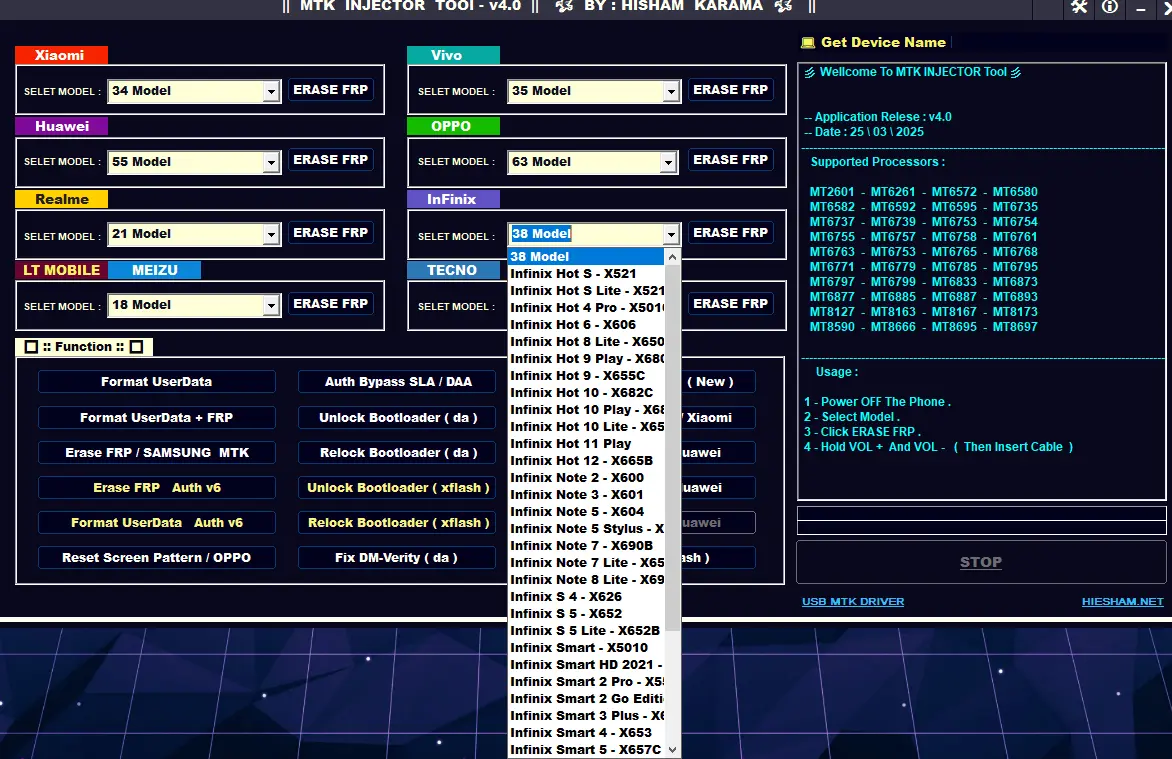
MTK INJECTOR TOOL v4.0 is a powerful software made for mobile phone repair work. It is mainly used to fix phones that are locked after factory reset. Many users reset their phones and later forget the Google account. Because of this, the phone asks for the old account and does not allow access. This problem is very common in daily life.
General Features
FRP erase on MTK devices
Userdata format option
FRP + userdata format
Support for old and new MTK security
Auth v6 supported
Model-wise FRP solution
One-click operation
Stable and fast performance
Brand Specific Features
Xiaomi / Redmi FRP erase
POCO FRP erase
Huawei FRP erase
Honor FRP erase
Vivo FRP erase
OPPO FRP erase
Realme FRP erase
Infinix FRP erase
Tecno FRP erase
Meizu FRP erase
LT Mobile FRP erase
Advanced Functions
Auth bypass SLA / DAA
Partition Format Guru (New)
Erase MiCloud + FRP (Xiaomi)
Backup OEM info (Huawei)
Restore OEM info (Huawei)
Erase Huawei ID
Unlock bootloader (DA)
Relock bootloader (DA)
Unlock bootloader (xflash)
Relock bootloader (xflash)
Fix DM-Verity (DA)
Fix DM-Verity (xflash)
Reset screen pattern (OPPO)
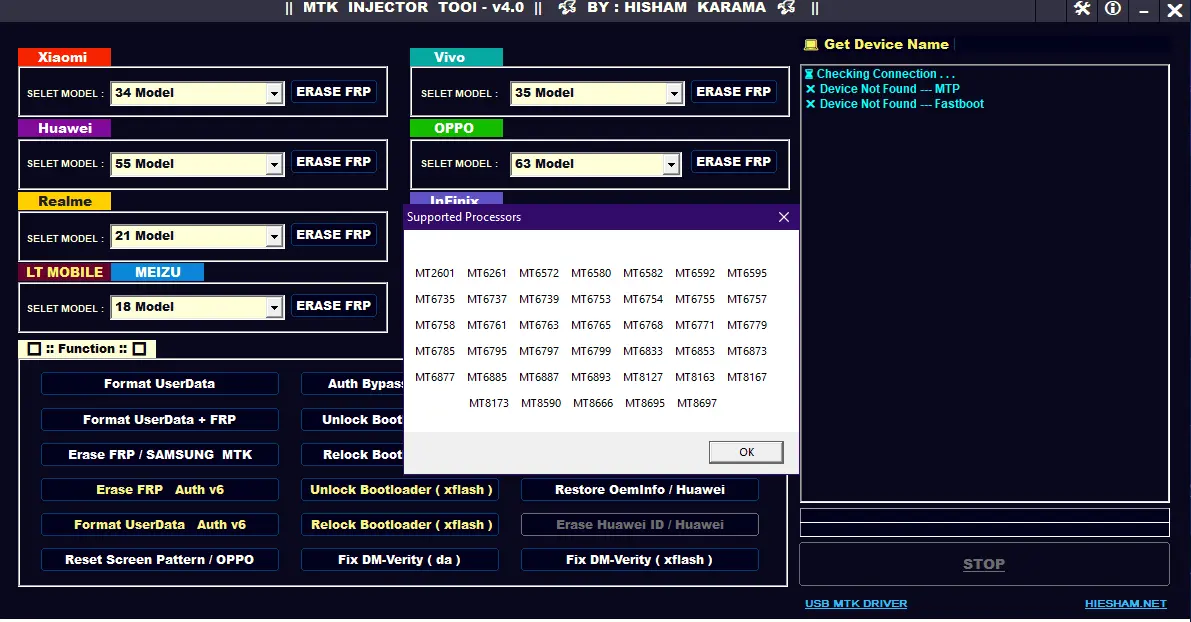
Supported Models List
The tool supports a very large number of models from:
Redmi / POCO
Huawei / Honor
Realme
Vivo
OPPO
Infinix
Tecno
Meizu
LT Mobile
Brand Model
Redmi Y2
Redmi Y3
Redmi Mi Play (lotus)
Redmi 6 (cereus)
Redmi 6A (cactus)
Redmi 9A (dandelion)
Redmi 9C / 9C NFC (angelica)
Redmi 9 Activ
Redmi 9 (lancelot)
Redmi Note 3
Redmi Note 4 (nikel)
Redmi Note 8 (biloba)
Redmi Note 8 Pro (begonia)
Redmi Note 9 (merlin)
Redmi Note 9T
Redmi 10X 4G / 5G
Redmi K30 Ultra
Redmi K40 Gaming
POCO F3 GT
POCO M2 (shiva)
POCO M3 Pro 5G
POCO C3 (angelica)
POCO C31
POCO X3 GT
POCO M4 Pro
Brand Model
Huawei Y3 2017 (CRO-L02/L22/L03)
Huawei Y5 2017 / 2019
Huawei Y5P
Huawei Y6 2019 (All variants)
Huawei Y6 Pro 2019
Huawei Y6S
Huawei Y9A
Huawei Enjoy 20 / 20 Plus / 20E
Huawei Enjoy Z 5G
Huawei Nova 8 SE
Huawei Nova Y60
Honor 7S
Honor 8A
Honor 8S
Honor Y6s
Honor X20 SE
Honor Play 4 / Play 6T
Honor Play 9A
Honor 50 SE
Honor V40 5G
Honor V9 Play
Brand Model
Realme 1
Realme 3 / 3i
Realme 6 / 6i
Realme 7
Realme 8
Realme C2 / C3
Realme C11 / C12 / C15
Realme C20 / C21
Realme C25
Realme Narzo Series
Realme Q2 / Q2 Pro
Realme Q3 Pro
Brand Model
Vivo iQOO Z1 5G
Vivo X70 / X70 Pro
Vivo S12 Pro
Vivo Y3 / Y3s
Vivo Y12 / Y12s
Vivo Y15 / Y15s
Vivo Y17
Vivo Y19
Vivo Y20G
Vivo Y30
Vivo Y33s 5G
Vivo Y54s
Vivo Y55 5G
Vivo Y71T
Vivo Y74S
Vivo Y81
Vivo Y83
Vivo Y90
Vivo Y91 / Y91i
Brand Model
OPPO A3 / A5s
OPPO A7 / A8
OPPO A9 / A9x
OPPO A12 / A15 / A15s
OPPO A31
OPPO A53 / A53s
OPPO A54 / A55 / A55 5G
OPPO A72 / A73 5G
OPPO A83
OPPO A91
OPPO A92s
OPPO A93
OPPO A94
OPPO F5 / F7 / F9
OPPO Reno 2Z / 2F
OPPO Reno 3 / 3 Pro
OPPO Reno 4 / 4 Lite / 4Z
OPPO Reno 5 / 5F
OPPO Reno 6 / 6 Pro
Brand Model
Infinix Hot 4 / 6 / 8 / 9 / 10 / 11 / 12
Infinix Note 2 / 3 / 5 / 7 / 8
Infinix Smart 2 / 3 / 4 / 5 / 6
Infinix Zero 5 / 5 Pro
Infinix Zero 5G
Infinix Zero 8 / 8i
Brand Model
Tecno Spark Series (K7 to Spark 8T)
Tecno Spark Go / Spark Air
Tecno Pova 5G
Tecno Camon Series
Tecno Pouvoir Series
Tecno Pop Series
Tecno Phantom 6 / 6S / 8 / 9
Brand Model
Meizu M3 / M3 Note
Meizu M5 / M5s
Meizu M8 / V8
Meizu MX5 / MX6
Meizu Pro 6 / Pro 7
LT Mobile M20 / M20s
LT Mobile M25
LT Mobile M3
How to Install MTK INJECTOR TOOL v4.0 (Updated Method)
First, download the RAR file of MTK INJECTOR TOOL v4.0 from the given download link. After the download is finished, extract all files from the RAR. You can extract them to any location you like, but desktop is recommended because it is easy to find and manage. Make sure all files are extracted properly and not left inside the RAR file.
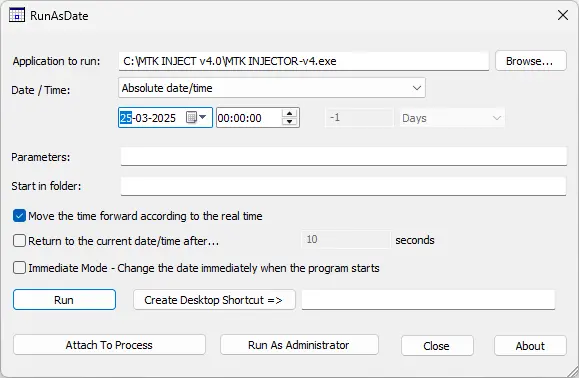
After extraction, open the extracted folder. Inside this folder, you will find a file named runasdate.exe. This file is very important for running the tool. Double-click on runasdate.exe to open it. A small window will appear on your screen. Do not close this window until all steps are completed.
Now, inside the runasdate window, click on the Browse option and load the main tool file named MTK INJECTOR-v4.exe. Once the file is selected, you will see date options. Here, manually set the date to 25 March 2025. After selecting the correct date, click on the RUN button at the bottom.
The tool will now start opening on your computer. Wait a few seconds until the main interface loads fully. Once opened, the tool is ready to use and all functions will work normally. You can now connect your device and start using the tool for FRP and other supported operations.
Important Note
This tool is developed with an expiry limit. If you try to run it directly, it may show expired or not open. Using runasdate.exe allows the tool to run without issues. The tool is free to use until 25 March 2025, and this method is working 100%.
For new updates and latest tools, always download from the trusted source and keep checking for updates regularly.
How to Use (Basic Steps)
Power off the phone.
Open MTK INJECTOR TOOL v4.0.
Select the correct brand and model.
Click the required function like Erase FRP.
Hold Volume + or Volume - and connect USB cable.
Wait until the process completes.
DOWNLOAD LINK:
Rar Password:- gsmyogesh.com
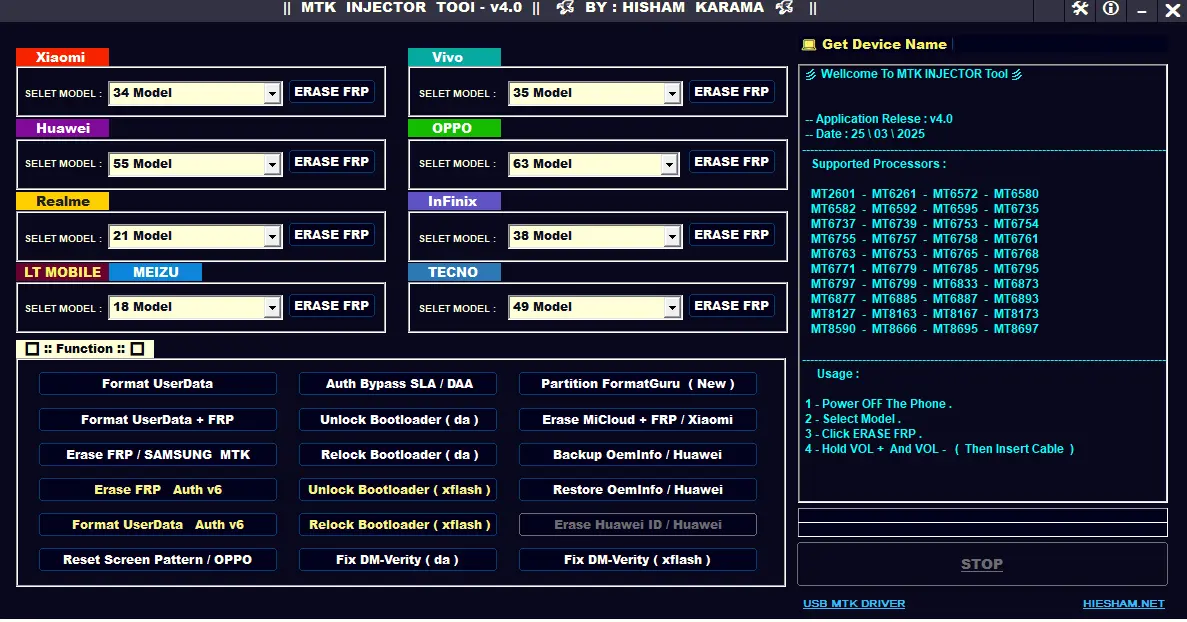

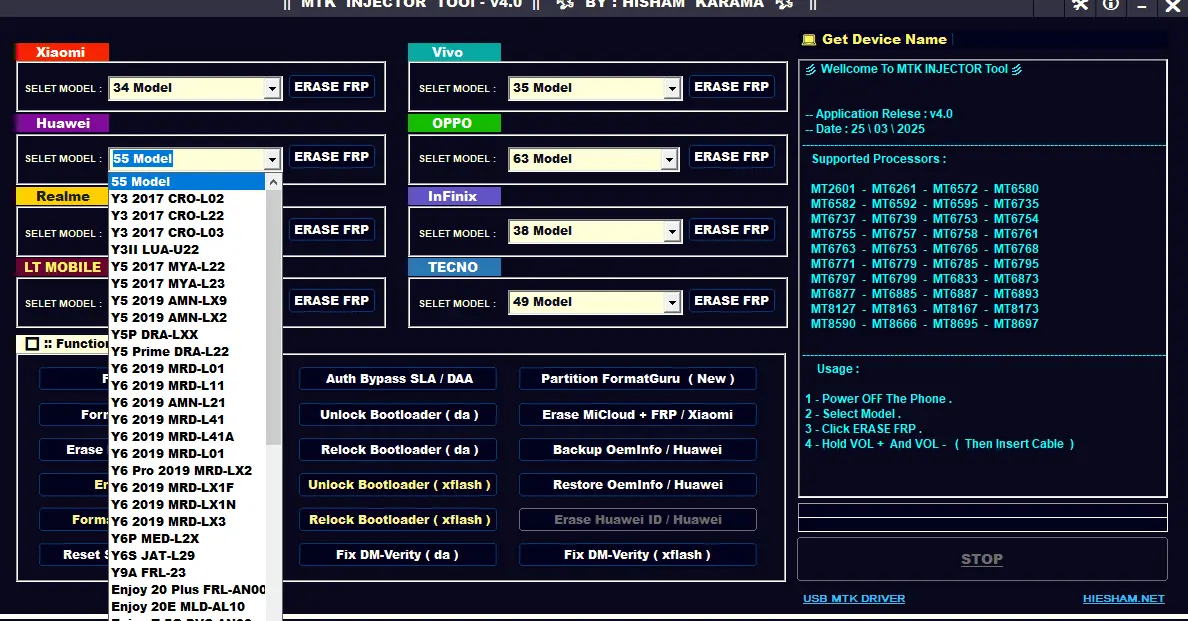
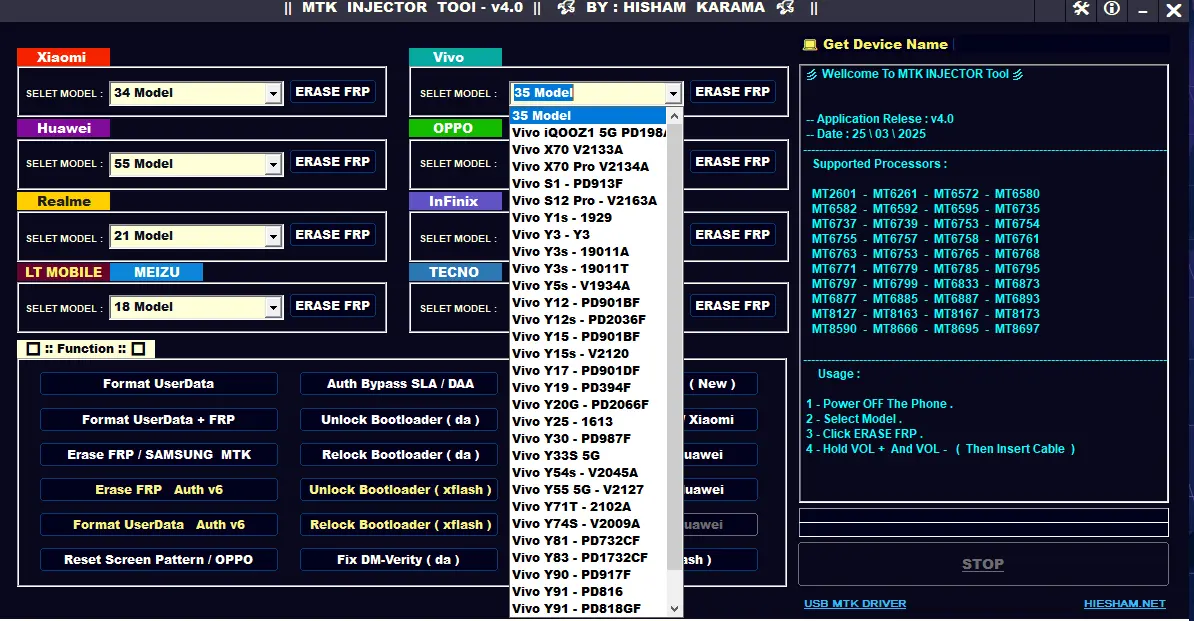
MTK INJECTOR TOOL v4.0 is a powerful software made for mobile phone repair work. It is mainly used to fix phones that are locked after factory reset. Many users reset their phones and later forget the Google account. Because of this, the phone asks for the old account and does not allow access. This problem is very common in daily life.
General Features
FRP erase on MTK devices
Userdata format option
FRP + userdata format
Support for old and new MTK security
Auth v6 supported
Model-wise FRP solution
One-click operation
Stable and fast performance
Brand Specific Features
Xiaomi / Redmi FRP erase
POCO FRP erase
Huawei FRP erase
Honor FRP erase
Vivo FRP erase
OPPO FRP erase
Realme FRP erase
Infinix FRP erase
Tecno FRP erase
Meizu FRP erase
LT Mobile FRP erase
Advanced Functions
Auth bypass SLA / DAA
Partition Format Guru (New)
Erase MiCloud + FRP (Xiaomi)
Backup OEM info (Huawei)
Restore OEM info (Huawei)
Erase Huawei ID
Unlock bootloader (DA)
Relock bootloader (DA)
Unlock bootloader (xflash)
Relock bootloader (xflash)
Fix DM-Verity (DA)
Fix DM-Verity (xflash)
Reset screen pattern (OPPO)
Supported Models List
The tool supports a very large number of models from:
Redmi / POCO
Huawei / Honor
Realme
Vivo
OPPO
Infinix
Tecno
Meizu
LT Mobile
Brand Model
Redmi Y2
Redmi Y3
Redmi Mi Play (lotus)
Redmi 6 (cereus)
Redmi 6A (cactus)
Redmi 9A (dandelion)
Redmi 9C / 9C NFC (angelica)
Redmi 9 Activ
Redmi 9 (lancelot)
Redmi Note 3
Redmi Note 4 (nikel)
Redmi Note 8 (biloba)
Redmi Note 8 Pro (begonia)
Redmi Note 9 (merlin)
Redmi Note 9T
Redmi 10X 4G / 5G
Redmi K30 Ultra
Redmi K40 Gaming
POCO F3 GT
POCO M2 (shiva)
POCO M3 Pro 5G
POCO C3 (angelica)
POCO C31
POCO X3 GT
POCO M4 Pro
Brand Model
Huawei Y3 2017 (CRO-L02/L22/L03)
Huawei Y5 2017 / 2019
Huawei Y5P
Huawei Y6 2019 (All variants)
Huawei Y6 Pro 2019
Huawei Y6S
Huawei Y9A
Huawei Enjoy 20 / 20 Plus / 20E
Huawei Enjoy Z 5G
Huawei Nova 8 SE
Huawei Nova Y60
Honor 7S
Honor 8A
Honor 8S
Honor Y6s
Honor X20 SE
Honor Play 4 / Play 6T
Honor Play 9A
Honor 50 SE
Honor V40 5G
Honor V9 Play
Brand Model
Realme 1
Realme 3 / 3i
Realme 6 / 6i
Realme 7
Realme 8
Realme C2 / C3
Realme C11 / C12 / C15
Realme C20 / C21
Realme C25
Realme Narzo Series
Realme Q2 / Q2 Pro
Realme Q3 Pro
Brand Model
Vivo iQOO Z1 5G
Vivo X70 / X70 Pro
Vivo S12 Pro
Vivo Y3 / Y3s
Vivo Y12 / Y12s
Vivo Y15 / Y15s
Vivo Y17
Vivo Y19
Vivo Y20G
Vivo Y30
Vivo Y33s 5G
Vivo Y54s
Vivo Y55 5G
Vivo Y71T
Vivo Y74S
Vivo Y81
Vivo Y83
Vivo Y90
Vivo Y91 / Y91i
Brand Model
OPPO A3 / A5s
OPPO A7 / A8
OPPO A9 / A9x
OPPO A12 / A15 / A15s
OPPO A31
OPPO A53 / A53s
OPPO A54 / A55 / A55 5G
OPPO A72 / A73 5G
OPPO A83
OPPO A91
OPPO A92s
OPPO A93
OPPO A94
OPPO F5 / F7 / F9
OPPO Reno 2Z / 2F
OPPO Reno 3 / 3 Pro
OPPO Reno 4 / 4 Lite / 4Z
OPPO Reno 5 / 5F
OPPO Reno 6 / 6 Pro
Brand Model
Infinix Hot 4 / 6 / 8 / 9 / 10 / 11 / 12
Infinix Note 2 / 3 / 5 / 7 / 8
Infinix Smart 2 / 3 / 4 / 5 / 6
Infinix Zero 5 / 5 Pro
Infinix Zero 5G
Infinix Zero 8 / 8i
Brand Model
Tecno Spark Series (K7 to Spark 8T)
Tecno Spark Go / Spark Air
Tecno Pova 5G
Tecno Camon Series
Tecno Pouvoir Series
Tecno Pop Series
Tecno Phantom 6 / 6S / 8 / 9
Brand Model
Meizu M3 / M3 Note
Meizu M5 / M5s
Meizu M8 / V8
Meizu MX5 / MX6
Meizu Pro 6 / Pro 7
LT Mobile M20 / M20s
LT Mobile M25
LT Mobile M3
How to Install MTK INJECTOR TOOL v4.0 (Updated Method)
First, download the RAR file of MTK INJECTOR TOOL v4.0 from the given download link. After the download is finished, extract all files from the RAR. You can extract them to any location you like, but desktop is recommended because it is easy to find and manage. Make sure all files are extracted properly and not left inside the RAR file.
After extraction, open the extracted folder. Inside this folder, you will find a file named runasdate.exe. This file is very important for running the tool. Double-click on runasdate.exe to open it. A small window will appear on your screen. Do not close this window until all steps are completed.
Now, inside the runasdate window, click on the Browse option and load the main tool file named MTK INJECTOR-v4.exe. Once the file is selected, you will see date options. Here, manually set the date to 25 March 2025. After selecting the correct date, click on the RUN button at the bottom.
The tool will now start opening on your computer. Wait a few seconds until the main interface loads fully. Once opened, the tool is ready to use and all functions will work normally. You can now connect your device and start using the tool for FRP and other supported operations.
Important Note
This tool is developed with an expiry limit. If you try to run it directly, it may show expired or not open. Using runasdate.exe allows the tool to run without issues. The tool is free to use until 25 March 2025, and this method is working 100%.
For new updates and latest tools, always download from the trusted source and keep checking for updates regularly.
How to Use (Basic Steps)
Power off the phone.
Open MTK INJECTOR TOOL v4.0.
Select the correct brand and model.
Click the required function like Erase FRP.
Hold Volume + or Volume - and connect USB cable.
Wait until the process completes.
DOWNLOAD LINK:
Rar Password:- gsmyogesh.com


