

Silent update Released 
 ️ Remove iCloud Open Menu without USB/Without Proxy
1- Open : EFT Pro go to Apple
> Misc
> Remove iCloud Open Menu without USB/Without Proxy
> Press Start
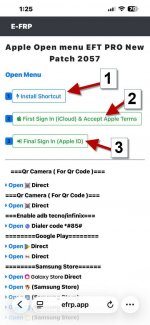
2- open : EFRP.APP
1- Press Install SHortcut
> Press Add SHortcut
> Back to EFRP.APP
2- Press First Sign in (iCloud) Accept Apple Terms
> Back to EFRP.APP
3- Press Login apple
> share with EFT Pro
> Press Always Allow
3- Enter the Code in EFT Pro Box
4- Press OK
5- Check FMI OFF
6- Erase or Flash device
PS: you get in log : Device Not Found
Go to Settings - Safari - Advanced - Web Inspector, and turn it On
Full Steps On Channal Youtube EFT Dongle Sooon
️ Remove iCloud Open Menu without USB/Without Proxy 1- Open : EFT Pro go to Apple
> Misc
> Remove iCloud Open Menu without USB/Without Proxy
> Press Start
2- open : EFRP.APP
1- Press Install SHortcut
> Press Add SHortcut
> Back to EFRP.APP
2- Press First Sign in (iCloud) Accept Apple Terms
> Back to EFRP.APP
3- Press Login apple
> share with EFT Pro
> Press Always Allow
3- Enter the Code in EFT Pro Box
4- Press OK
5- Check FMI OFF
6- Erase or Flash device
PS: you get in log : Device Not Found
Go to Settings - Safari - Advanced - Web Inspector, and turn it On
Full Steps On Channal Youtube EFT Dongle Sooon
