

Open unlocktool
select HiSilicon Kirin 710F Emmc [Unlock BL]
testpoint
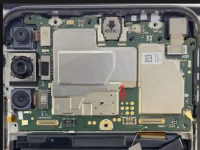
install driver if needed link here:
Code Name : Hi710F_Emmc_UL
Operation : Kirin Testpoint [2]
Authenticating... OK
Retrieving server data... OK [4.69 MiB]
Scanning port... COM4
Connecting to port... OK
Connection : USB 1.0 Full-Speed
USB Driver : [HUAWEI Incorporated] HSPL_usbvcom - Version : 2.0.0.0
Initializing... OK
Writing patch1... OK 1.393s
Writing patch2... OK 0.236s
Writing patch3... OK 0.437s
Reading partition map... OK [71]
Searching for bootloader key... OK [0:18874368:5242880]
Patching bootloader... OK
Please disconnect device and enter testpoint again!
Scanning port... COM4
Connecting to port... OK
Connection : USB 1.0 Full-Speed
USB Driver : [HUAWEI Incorporated] HSPL_usbvcom - Version : 2.0.0.0
Writing sec_usb_xloader... OK 1.123s
Writing sec_usb_xloader2... OK 0.281s
Writing sec_unlock2... OK 0.009s
Writing sec_unlock3... OK 0.117s
Writing sec_fastboot... OK 31.343s
UNLOCKTOOL 2025.09.21.0
Elapsed time : 1 minute 36 seconds
back up oeminfo (for safety reason)
Reading OEMINFO... OK
UNLOCKTOOL 2025.09.21.0
Elapsed time : 2 seconds
Optional: Para alam mo kung anong build id in case magka problema.
UNLOCKTOOL 2025.09.21.0
Elapsed time : 0 seconds
Retrieving server data... OK
Validating data... OK
Write parameters :
Model : EML-L29
Vendor/Country : hw/demo
Build Version : EML-L29 8.1.0.107D(EUC652)
Initializing... OK
Writing OEMINFO... OK
UNLOCKTOOL 2025.09.21.0
Elapsed time : 3 seconds
Note: I just try EML-L29 wala kasing art-l28 at success naman
select HiSilicon Kirin 710F Emmc [Unlock BL]
testpoint
install driver if needed link here:
1. [USB 1.0] UNLOCK FASTBOOT
Selected Model : HiSilicon Kirin 710F Emmc [Unlock BL]Code Name : Hi710F_Emmc_UL
Operation : Kirin Testpoint [2]
Authenticating... OK
Retrieving server data... OK [4.69 MiB]
Scanning port... COM4
Connecting to port... OK
Connection : USB 1.0 Full-Speed
USB Driver : [HUAWEI Incorporated] HSPL_usbvcom - Version : 2.0.0.0
Initializing... OK
Writing patch1... OK 1.393s
Writing patch2... OK 0.236s
Writing patch3... OK 0.437s
Reading partition map... OK [71]
Searching for bootloader key... OK [0:18874368:5242880]
Patching bootloader... OK
Please disconnect device and enter testpoint again!
Scanning port... COM4
Connecting to port... OK
Connection : USB 1.0 Full-Speed
USB Driver : [HUAWEI Incorporated] HSPL_usbvcom - Version : 2.0.0.0
Writing sec_usb_xloader... OK 1.123s
Writing sec_usb_xloader2... OK 0.281s
Writing sec_unlock2... OK 0.009s
Writing sec_unlock3... OK 0.117s
Writing sec_fastboot... OK 31.343s
UNLOCKTOOL 2025.09.21.0
Elapsed time : 1 minute 36 seconds
back up oeminfo (for safety reason)
2. [FB] BACKUP OEMINFO
FB LockState : unlockedReading OEMINFO... OK
UNLOCKTOOL 2025.09.21.0
Elapsed time : 2 seconds
Optional: Para alam mo kung anong build id in case magka problema.
[FB] READ INFO
| Key | Value |
|---|---|
| HWNFF Version | Ver2.3 |
| Dongle Info | RSA-2048,0x9001,0x7000,0x6000,0x5100,0x5000 |
| Base Ver | ART-LGRP2-OVS 10.1.0.263 |
| Build Ver | ARTH-L28 10.1.0.263(C636E2R2P1) |
| Vendor/Country | hw/spcseas |
| Android Ver | 10 |
| Equipment Model | ARTH-L28 |
| Custom Ver | ARTH-L28-CUST 10.1.0.2(C636) |
| Model | ART-L28 |
| Key Version | huawei_key_v1 |
| FB LockState | unlocked |
| Preload Ver | ARTH-L28-PRELOAD 10.1.0.1(C636R2) |
UNLOCKTOOL 2025.09.21.0
Elapsed time : 0 seconds
3. [FB] CHANGE OEMINFO
FB LockState : unlockedRetrieving server data... OK
Validating data... OK
Write parameters :
Model : EML-L29
Vendor/Country : hw/demo
Build Version : EML-L29 8.1.0.107D(EUC652)
Initializing... OK
Writing OEMINFO... OK
UNLOCKTOOL 2025.09.21.0
Elapsed time : 3 seconds
Note: I just try EML-L29 wala kasing art-l28 at success naman

